
Performance Optimization Tips for High-Traffic Applications
In today’s fast-paced digital landscape, application performance is critical to business success. High-traffic applications must deliver fast, reliable, and seamless user experiences—even under heavy load. Poor performance can lead to increased bounce rates, lost revenue, and damage to brand reputation.
Optimizing performance is not just a technical necessity—it’s a strategic advantage. Below are proven tips to ensure your application performs efficiently, even during peak traffic periods.
1. Optimize Database Performance
Your database is the backbone of your application. Inefficient queries and poor database design can quickly become bottlenecks.
Best Practices:
- Use indexing to speed up query execution
- Optimize complex queries and avoid unnecessary joins
- Implement database caching (e.g., Redis, Memcached)
- Regularly clean and maintain your database
2. Implement Caching Strategies
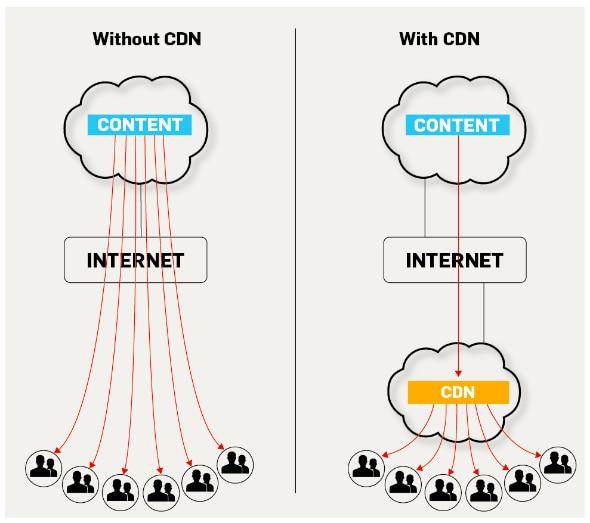
Caching reduces the load on servers by storing frequently accessed data closer to users.
Types of Caching:
- Browser Caching – Stores static files on the user’s device
- Server-Side Caching – Reduces database hits
- Content Delivery Networks (CDNs) – Distribute content globally
Benefits:
- Faster response times
- Reduced server load
- Improved scalability
3. Use Load Balancing
Load balancing distributes incoming traffic across multiple servers to prevent overload.
Advantages:
- Ensures high availability
- Improves fault tolerance
- Enhances performance during traffic spikes
Popular tools include Nginx, HAProxy, and cloud-based load balancers.
4. Optimize Frontend Performance
Frontend optimization directly impacts user experience.
Key Techniques:
- Minify CSS, JavaScript, and HTML
- Use lazy loading for images and videos
- Compress images without losing quality
- Reduce HTTP requests
5. Leverage Cloud Scalability
Cloud platforms provide flexible infrastructure that scales based on demand.
Strategies:
- Auto-scaling to handle traffic spikes
- Use microservices architecture
- Deploy applications using containerization (Docker, Kubernetes)
6. Monitor and Analyze Performance
Continuous monitoring helps identify performance issues before they impact users.
Recommended Tools:
- Google Analytics
- New Relic
- Datadog
- AWS CloudWatch
Track Metrics Like:
- Response time
- Server load
- Error rates
- User behavior
7. Optimize API Performance
APIs are essential for modern applications and must be efficient.
Tips:
- Use pagination for large datasets
- Implement rate limiting
- Optimize payload size
- Use asynchronous processing where possible
8. Enable Compression
Compression reduces the size of data transferred between server and client.
Common Methods:
- Gzip
- Brotli
This leads to faster load times and reduced bandwidth usage.
9. Conduct Load Testing
Simulate high traffic conditions to evaluate how your system performs under stress.
Tools for Load Testing:
- Apache JMeter
- LoadRunner
- k6
10. Optimize Code and Architecture
Efficient code and scalable architecture are key to handling growth.
Best Practices:
- Follow clean coding standards
- Refactor regularly
- Use asynchronous programming
- Avoid memory leaks
Summary
Performance optimization is an ongoing process that requires proactive planning and continuous improvement. By implementing these strategies, businesses can ensure their applications remain fast, reliable, and scalable—even under heavy traffic.
Investing in performance optimization not only enhances user satisfaction but also strengthens your competitive edge in the market.